
PtahCast
Project management with the forecast built in.
For macOS 26 or later. 14-day free trial, no account.
By buying you accept the terms of sale.
Question before you buy? Ask here. Already using PtahCast? Get support.
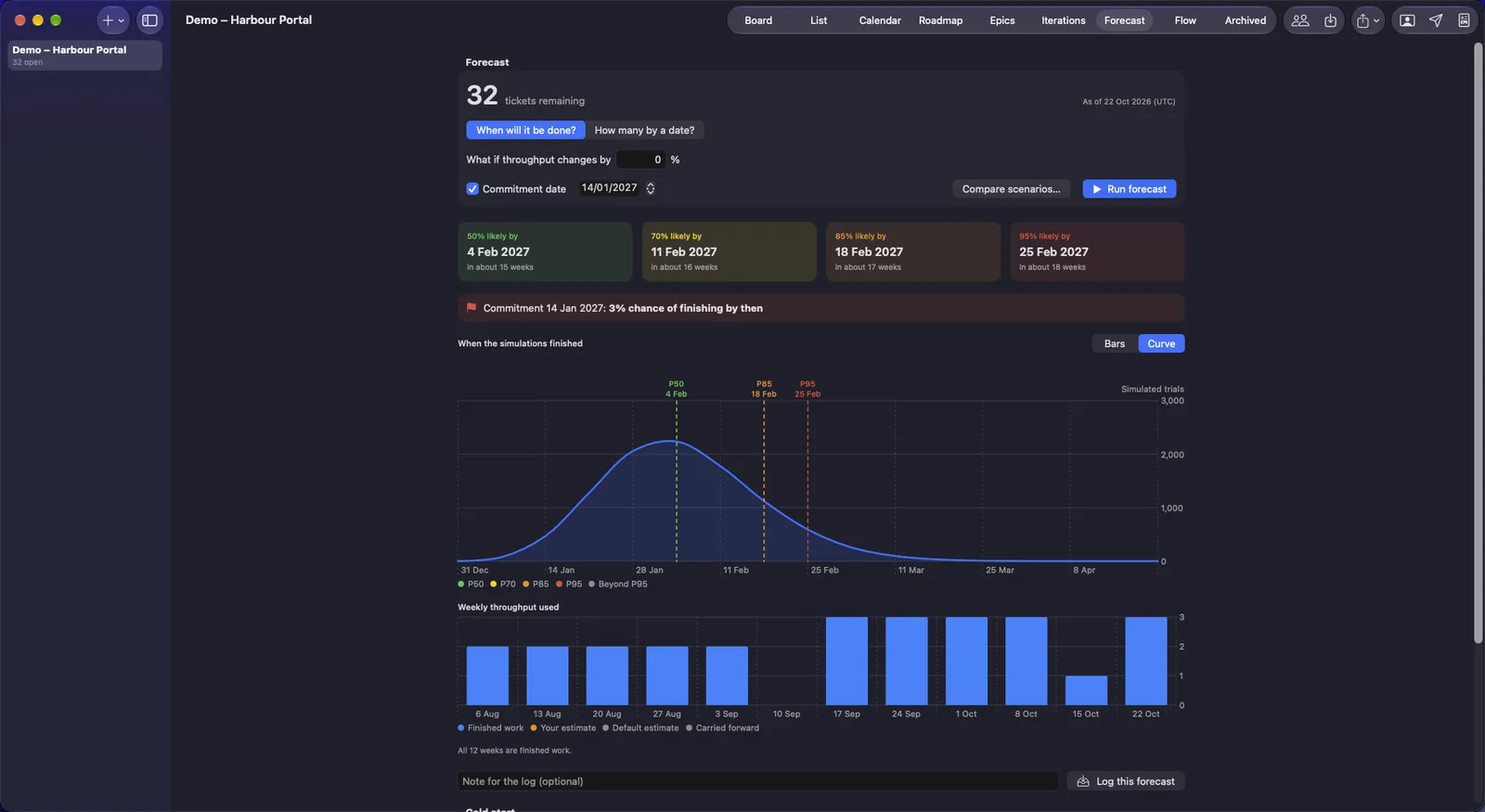
Forecast: when the open work will be done, at four levels of confidence. Screenshots show the built-in demo project.
Know when it will really be done.
PtahCast is a project management app for one project manager on one Mac. It reads how fast your team actually finishes work and tells you when the rest will be done, with a confidence level, so you can promise a date you can keep.
A forecast from your own record
PtahCast counts the tickets you finish each week and replays that pattern thousands of times against the work still open. There are no estimates and no story points anywhere in the app.
One tool, any method
Run a board, time-boxed iterations or a waterfall roadmap on the same tickets and epics, with the same forecast. Change your mind midway and nothing has to be moved.
Private by design
One person, one Mac. No account, no cloud and no seats. Your projects stay on your computer.
What it looks like.
The same demo project, seen four ways.
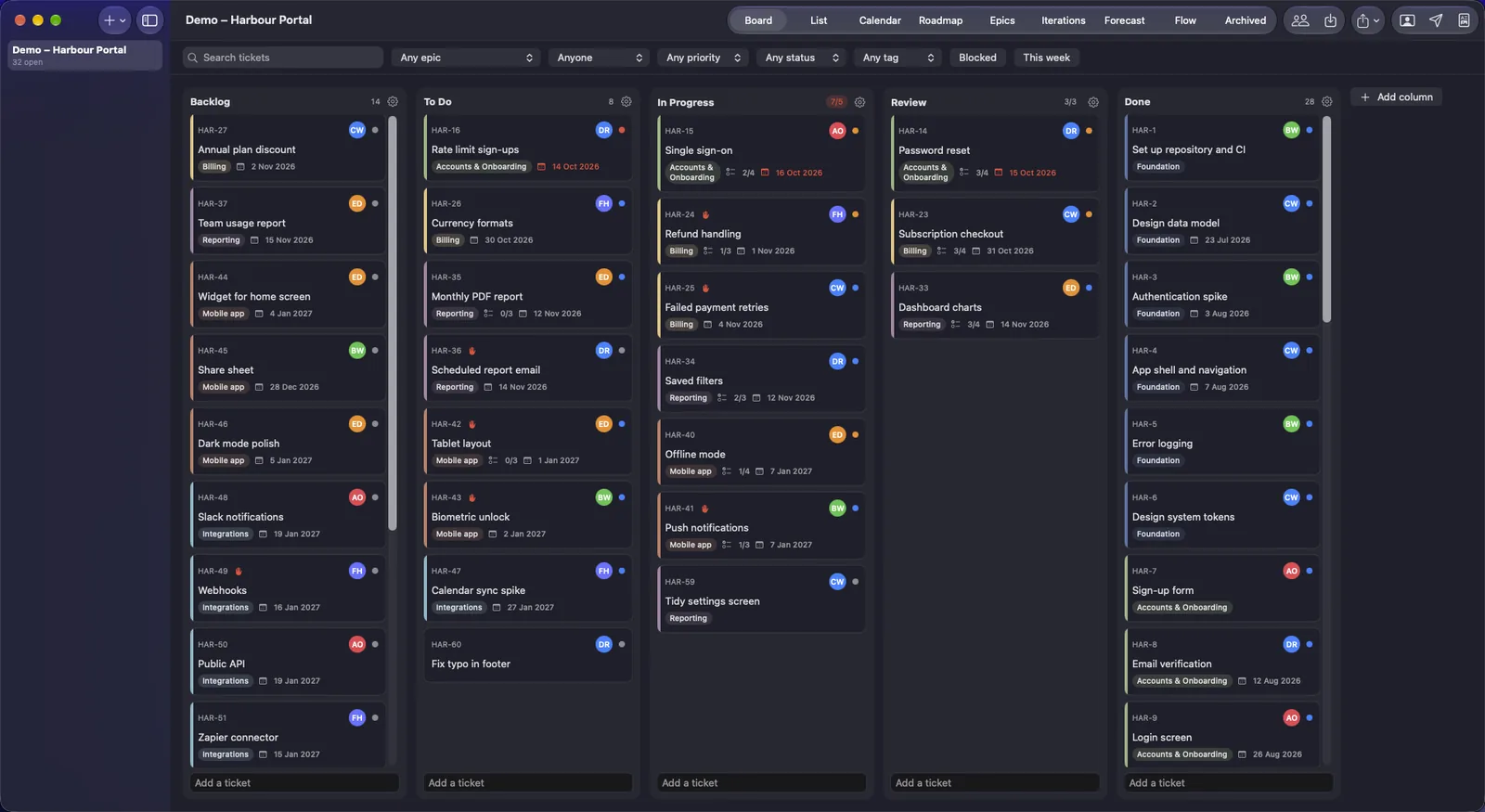
Board
Drag cards across columns of your own, with work-in-progress limits. Started and finished dates are recorded as you move them.
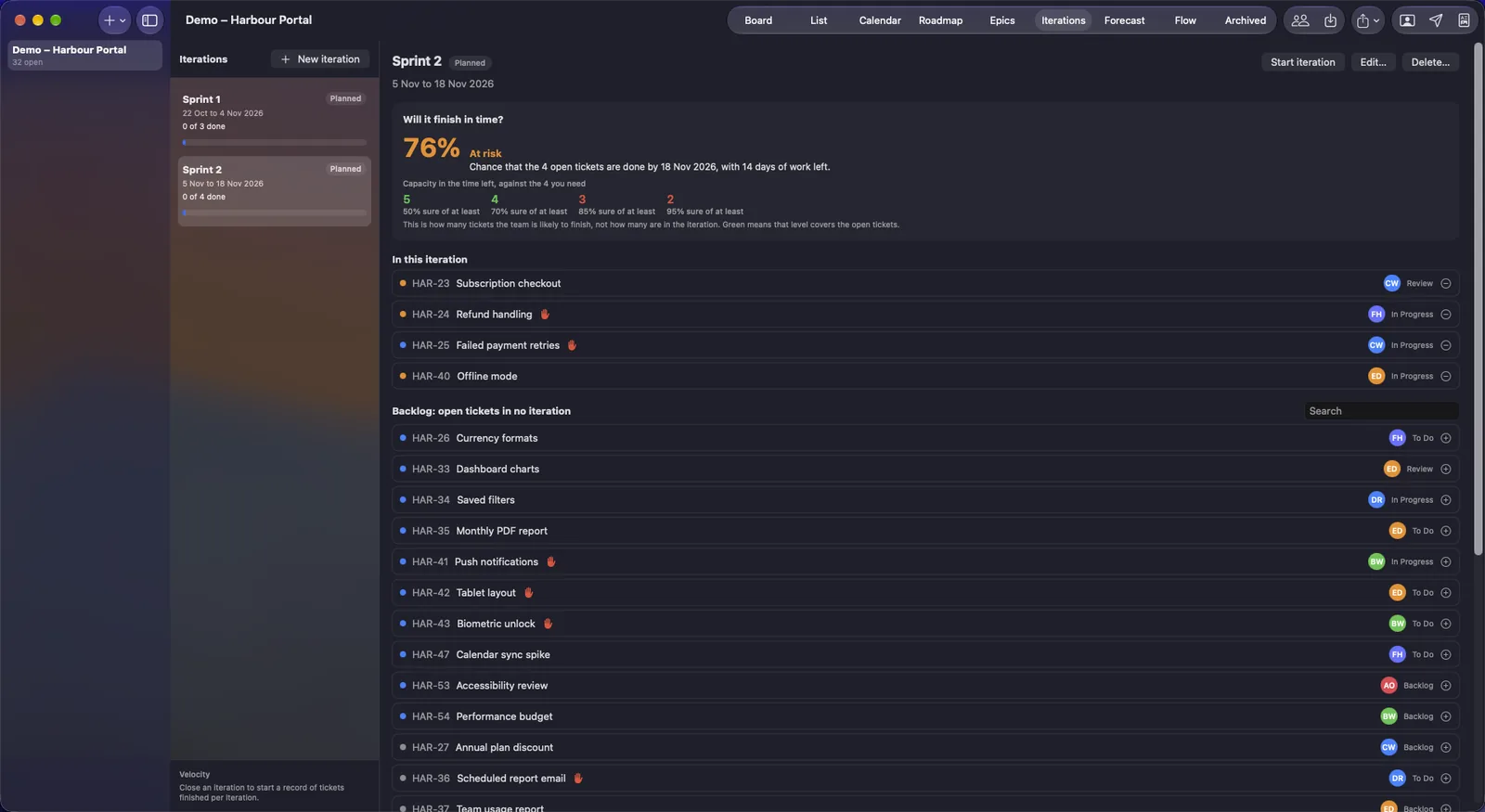
Iterations
Time-box the work, and see the chance that the open tickets finish in time.
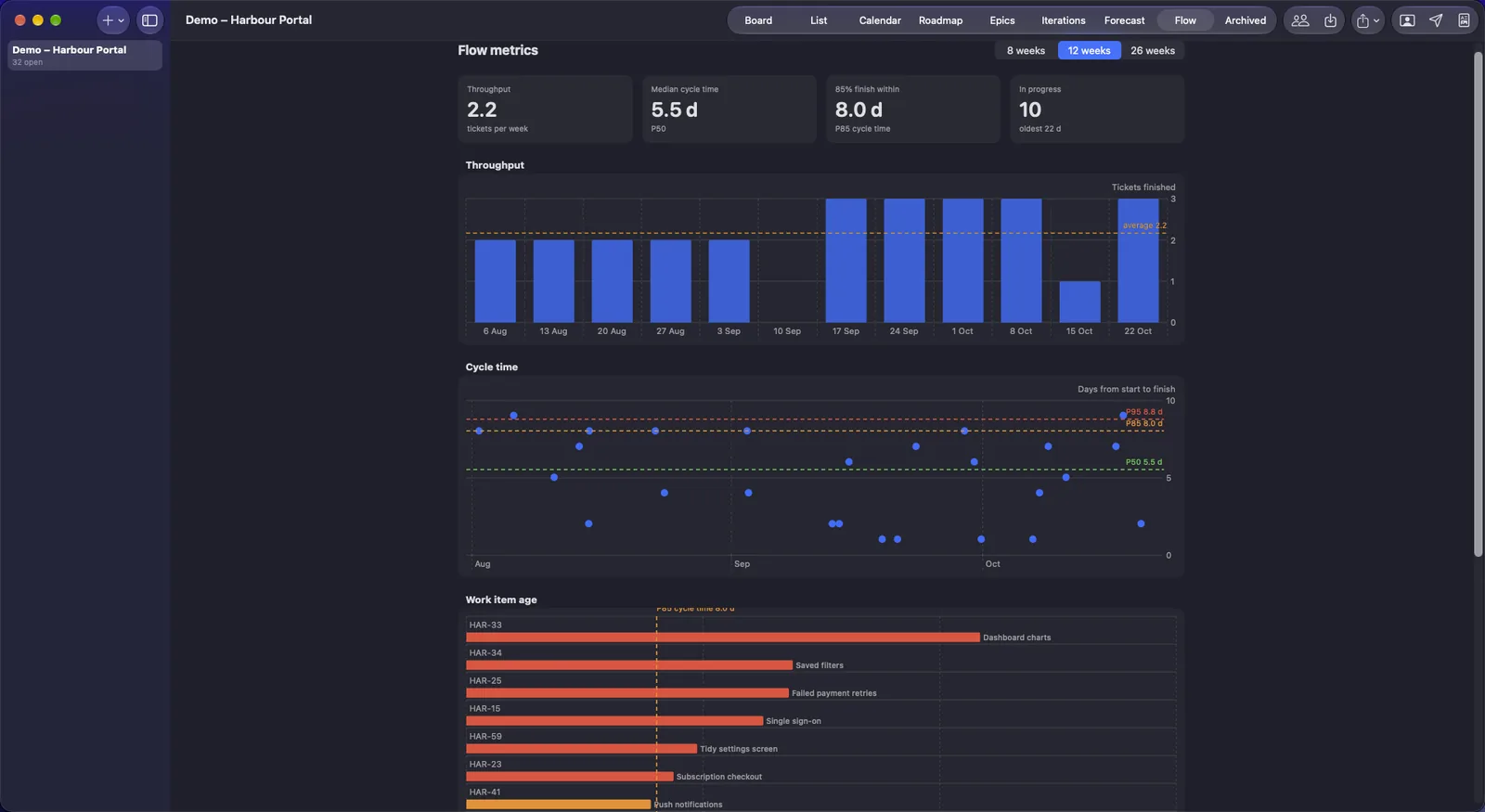
Flow
Throughput, cycle time and the age of work in progress, in one place.
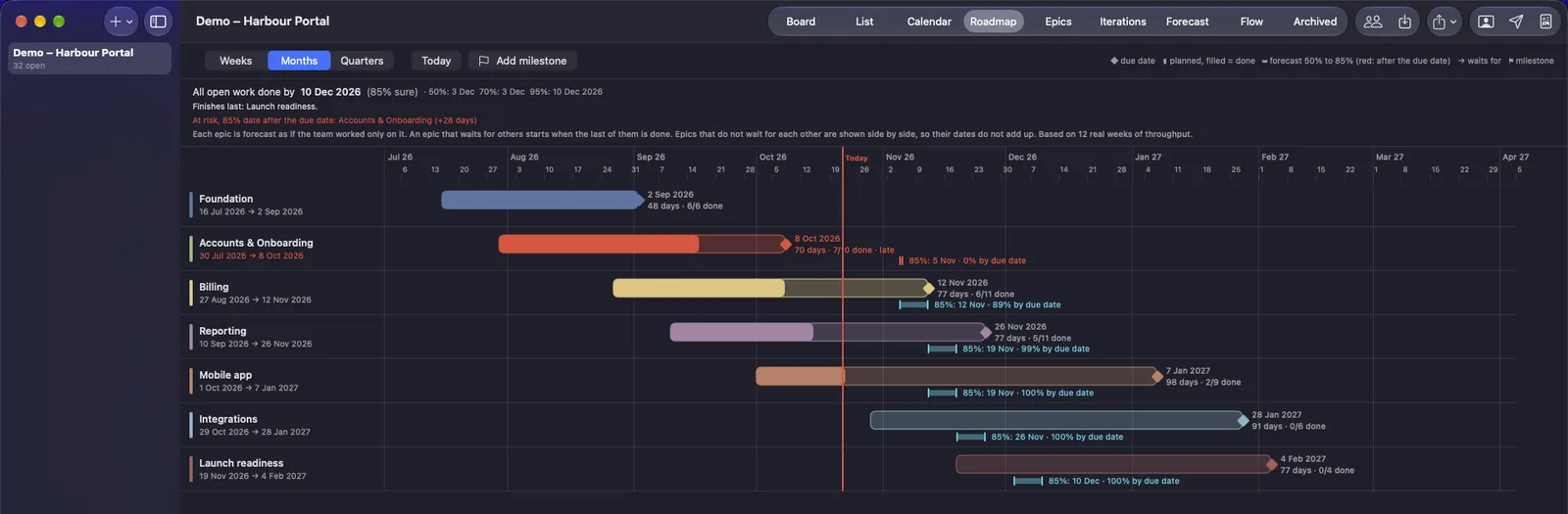
Roadmap
Epics as phases, with dependencies, milestones and a forecast range on every bar.
A range, not a single date.
Pick the level that fits the cost of being wrong. The 50 per cent date is even odds. The 85 per cent date is safe to promise to a client. The 95 per cent date is for a hard deadline.
What the forecast tells you
Built from your own weekly throughput.
When will it be done?
Dates at 50, 70, 85 and 95 per cent confidence for the work that remains, with a curve showing when every simulated run finished.
How many by a date?
Pick a date and see how many tickets you can count on finishing by then, at each level of confidence.
What if?
Change throughput by a percentage, or change the scope, and compare scenarios side by side. A new project can start forecasting before it has history.
One epic at a time
Forecast a single epic, with a setting for the share of the team's capacity it gets.
Commitment dates
Set the date you have agreed with the client and see the chance of making it. Log each forecast with a note, so there is a record of what you knew and when.
Was I right?
The accuracy card compares each logged forecast with what happened, and shows how often each confidence level came true. With fewer than five finished forecasts it tells you the sample is too small.
Kanban, iterations or a waterfall plan.
Project managers differ. Some want a board, some want sprints, some want phases and milestones in sequence. They all read the same tickets and epics.
Pick the view that matches how you work
Each one feeds the same forecast.
Kanban: flow, measured
Columns of your own and work-in-progress limits that warn you before the team overloads. Flow metrics cover throughput, cycle time, work item age and cumulative flow.
Iterations, without points
An iteration has a name, a goal, a first and last day and a set of tickets. One is active at a time, and the committed count is recorded when it starts. Closing it records what was finished and what carried over. Velocity is simply tickets finished per closed iteration.
Roadmap: phases and milestones
An epic with start and due dates is a phase. Chain epics with finish-to-start dependencies, which refuse loops and flag date overlaps. Add milestones with a date, notes and an optional epic that must be done by then.
A forecast for every epic
Each epic gets 50 and 85 per cent finish dates, the chance of meeting its due date and the 85 per cent slip in days. The roadmap also gives the project end at 50, 70, 85 and 95 per cent, the longest chain, and the chance of hitting each milestone.
Plain about the limit
Epics that do not wait for each other are shown side by side. They are not made to share the team's capacity, so their dates do not add up. The roadmap says so on screen.
A complete project system, not only a forecaster.
What else is in it
Everything a single project manager needs.
Five ways to see the work
Board, sortable list, epics with progress, calendar and roadmap, all on the same data.
Find anything fast
Search titles, descriptions, tags, comments and checklists. Filter by epic, iteration, assignee, priority, tag or status.
Tickets with substance
Checklists, blocked-by and related links, a blocked flag, due dates, tags, comments and attached file links.
People and development packs
Keep a list of people with email and telephone, and assign tickets to them. Flag this week's work and send each person a PDF of their tickets, with the attached files, from your own mail app. A pack never holds other people's tickets, client details or forecasts. People are labels for filtering and reports, not second users of the app.
Import and export
Bring tickets in from Excel or CSV with a ready-made template that has dropdowns. A file exported from PtahCast imports again with the same board and history. Export the ticket list to Excel or CSV, and back up a whole project as one file.
Reports with your name on them.
Eight PDF reports, four for your client and four for you, built from the data the app already holds. Add your logo, name and business details once, and the client's details per project.
For your client
Dates and progress, never your internal detail.
Delivery forecast
The 85 per cent date in large type, the 50, 70, 85 and 95 per cent dates, the chance of meeting the agreed date, the forecast curve and how the forecast has moved since the last one you logged.
Progress by epic
Share done, due date and status for each epic, with overall progress. No ticket titles and no blocked counts.
Completed this period
A changelog of the tickets finished between two dates, grouped by epic. Ticket titles only, with no assignees.
Forecast history
The 50, 85 and 95 per cent dates of every logged forecast over time, against the agreed date.
For your team
The detail you keep to yourself.
Risks and blockers
Blocked and overdue tickets, work in progress older than the 85 per cent cycle time, columns over their limit, and epics that are late or at risk.
Forecast accuracy
Each logged forecast against what happened, and how often each confidence level came true.
Workload by person
Open, blocked and overdue tickets per person, and what each finished in the last 28 days.
Flow health
The throughput trend, cycle time, ageing and work-in-progress limits, with sentences that read the numbers for you.
Sending them
Client and internal reports are kept apart.
Your own mail app
Email a report from the app and a new message opens in your mail program, with the PDF attached. A weekly pack builds the client and internal reports in one go.
Internal stays internal
The recipient is chosen by the kind of report and never falls back to the other address. An internal address that matches the client's cannot be saved, and internal reports are named and tagged as internal.
A footer you cannot remove
Your logo and name go on every report. The footer always says "Created with PtahCast".
Set up, work, forecast.
Three steps, and the forecast needs nothing extra from you.
- 1. Set upOn first run, start with a blank project, the demo project or a restored backup. Or import your tickets from Excel or CSV.
- 2. WorkMove cards as work starts and finishes. The dates are recorded for you, and that history is what the forecast reads.
- 3. ForecastRun the forecast whenever you need an answer, log it with your commitment date, and send the client report.
A 14-day free trial, then a one-time purchase. There is no subscription.
$39.99. Pay once. Yours to keep.
Try PtahCast free for 14 days with every feature on. If it earns a place in your work, one payment unlocks it for good.
- 1. TryDownload PtahCast and use it for 14 days. No card, no account.
- 2. UnlockPay once and open the licence file we email you.
- 3. KeepNo renewals and no subscription. Your projects stay yours either way.
The price is shown at checkout.
Good to know.
Do I have to estimate anything?
No. There are no estimates, story points or velocity in points anywhere in the app. The forecast reads the tickets you have actually finished.
How does the forecast work?
PtahCast counts how many tickets you finished in each week. It then draws weeks at random from that record, thousands of times over, until the open work is done. The share of those runs that finished by a date is the confidence level for that date.
How much history does it need?
A new project can start forecasting before it has history. The forecast improves as real weeks of throughput build up, and the Forecast screen tells you how many of the weeks it used are finished work.
Can I bring in tickets from another tracker?
Yes, through CSV or Excel. A simple export from another tracker usually imports as it is, because common column names such as summary, status and labels are recognised. Any problems are listed by row, and each ticket's dates are replayed so that it behaves like one you moved by hand.
Can my team use it together?
No. PtahCast is for one project manager on one Mac. There are no accounts, no sync and no shared projects. The people you add are labels for tickets and reports.
Does my data leave my Mac?
No. There is no account, no cloud and no sync. Your projects are stored on your computer. Back them up from the app as a single file.
Can I put my own name and logo on the reports?
Yes. Add your name, business, contact details and logo once, and the client details for each project. The footer of every report says "Created with PtahCast", and that cannot be switched off.
What happens when the trial ends?
PtahCast is free to try for 14 days, with the days left shown at the bottom of the window. After that it shows the unlock screen until you buy. The trial is remembered in your Keychain, so deleting and reinstalling the app does not restart it.
Which versions of macOS?
macOS 26 or later.
Is there a Windows or Linux version?
Both are in development. There is no release date yet.